> ## Documentation Index
> Fetch the complete documentation index at: https://docs.talqui.chat/llms.txt
> Use this file to discover all available pages before exploring further.
# Backend
## The plugin backend
The backend (`apps/api`) is the element where server-side work happens: it is what you build when your plugin must **read information or perform actions** in systems you own, or **expose tools** to the virtual agent. It is optional — a plugin can consist of only a widget and/or a settings page — but whenever a plugin needs to touch an external system securely, that logic belongs here. In the reference boilerplate it is a Node.js **Express** application, though the language and framework are your choice. When a plugin *does* have front-ends, they deliberately hold no integration logic and no external credentials, so everything sensitive flows through the backend.
You can see a complete, working backend implementation in the [`talqui-oss/talqui-plugin-example`](https://github.com/talqui-oss/talqui-plugin-example/tree/master/apps/api) repository. This ice-cream shop example shows all the patterns described here: MCP tools, REST routes, and how to delegate both to the same use cases.
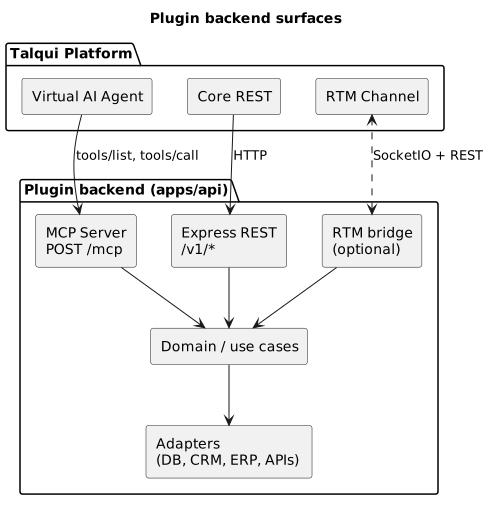
The backend exposes **three surfaces**, of which the first two are the important ones and the third is opt-in:
1. **MCP (Model Context Protocol)** — tools the Talqui **virtual AI agent** discovers and invokes during automated procedures.
2. **HTTP REST** — routes callable by any client that knows the URL: the Talqui platform, your own embedded UIs, or third-party consumers.
3. **RTM bridge** — an optional SocketIO + REST connection to the Talqui **Real-Time Messages** channel, used to register the plugin against tenants and react to platform events.
***
## MCP: giving the virtual agent new tools
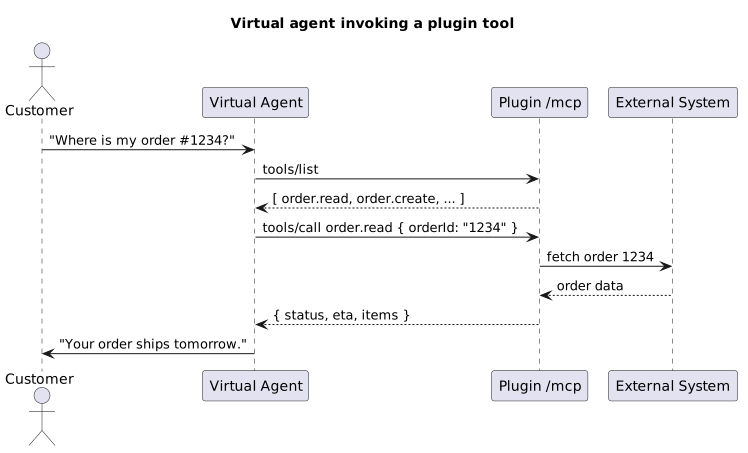
The **MCP endpoint** (conventionally `POST /mcp`) is what turns your plugin into building blocks the automated agent can use. The Model Context Protocol defines two operations that matter here:
* `tools/list` — the platform asks your server *"what can you do?"* and receives a catalog of tools, each with a name, a description, and a **JSON-Schema** for its inputs.
* `tools/call` — the platform invokes one tool with validated arguments and receives a structured result.
Every tool you register becomes available inside the Talqui **procedure editor** (the Chatbot / Flow Builder — see [Chatbot (Flow Builder)](/guides/bot-builder)) and to the virtual agent at attendance time. Design tools the way you would design good functions:
* **Name** them for the action, not the implementation (`order.read`, not `queryPostgres`).
* **Describe** them richly — the description is the agent's only clue about *when* to call the tool.
* **Constrain inputs** with JSON-Schema so malformed calls are rejected before your code runs.
* **Return structured, minimal data** — the agent reasons over what you return, so keep it clean and relevant.
For a concrete example, see the ice-cream shop's `StockList` and `OrderCreate` tools in the [`talqui-oss/talqui-plugin-example`](https://github.com/talqui-oss/talqui-plugin-example/tree/master/apps/api/src/mcp) repository. Both tools are described richly and constrain their inputs; the agent uses them to answer stock questions and place orders autonomously.
***
## REST: routes for everyone else
Alongside MCP, the backend exposes conventional **HTTP REST** routes (the boilerplate mounts them under `/v1/*`). These are the surface your **widget** and **settings** pages call, and they are equally usable by any authenticated client. Keep controllers thin — validate input, run a use case, return a response — and version the surface (`/v1`, then a parallel `/v2`) so you can evolve without breaking existing consumers.
A typical plugin exposes a handful of resource routes, for example:
| Method & path | Purpose |
| - | - |
| `POST /v1//search` | List/search records to render in the widget |
| `POST /v1//read` | Read a single record by id |
| `POST /v1//create` | Perform an action (create a ticket, place an order, sync a contact) |
| `POST /v1/healthcheck` | Liveness/readiness for your host |
The same capability is frequently exposed **twice** — once as an MCP tool (for the agent) and once as a REST route (for the widget) — both delegating to the same underlying use case. That is by design: it is what lets automation and human work share one coherent behavior. For a detailed walkthrough of this pattern in practice, see the [Ice Cream Shop](/guides/plugins/use-cases/ice-cream-shop) use case, where `StockList` and `OrderCreate` serve both the agent and the operator through different surfaces but the same business logic. The example code shows exactly how to structure this in [`talqui-oss/talqui-plugin-example`](https://github.com/talqui-oss/talqui-plugin-example/tree/master/apps/api/src).
***
## Authentication
The backend authenticates as a **plugin** or a **plugin connection**, never as an operator. Which one you use depends on scope:
* Cross-tenant work (e.g. *"which tenants installed me?"*) → **plugin** identity.
* Tenant-scoped work (the common case) → **plugin connection** identity, which returns data only for that tenant.
The exact header formats, the Basic-Auth encoding, and the endpoints to list installations are documented centrally in **[Authentication](/guides/introduction/authentication)**. When a request originates from your own widget or settings page, the **operator token** the host handed to that UI is forwarded to your backend; your backend then decides whether to trust it directly or exchange it for a plugin-connection call. Related runtime context (how a conversation is opened and identified) is covered in [Sessions](/guides/platform/sessions).
**Public-release hygiene** (critical for open-source plugins): never commit `.env` files or Talqui credentials, never depend on private registries, and make sure the project installs cleanly from the public npm registry. Credentials belong in your host's secret store, injected at runtime.
***
## The RTM bridge (optional)
When configured with a `PLUGIN_ID` and an RTM address, the backend opens a **SocketIO + REST** connection to the Talqui **RTM** channel. This lets the plugin **register itself** against tenants and **react to real-time platform events** (for example, reacting when a session starts). It is entirely opt-in: without RTM configured, the backend still serves MCP and REST locally and in production. For the RTM contract itself, see the [RTM API reference](/guides) and the platform's RTM documentation.
How the operator UI calls these routes with conversation context.
Scaffold and submit a backend from the boilerplate.
Plugin and plugin-connection credentials in detail.
This documentation is built and hosted on [Mintlify](https://mintlify.com), a developer documentation platform.