> ## Documentation Index
> Fetch the complete documentation index at: https://docs.talqui.chat/llms.txt
> Use this file to discover all available pages before exploring further.
# Settings
## The configuration page
The **settings** element is the second embedded front-end of a plugin: a single-page application Talqui renders **as an iframe inside the plugin's configuration screen**. Where the [widget](/guides/plugins/widget) serves the *operator* during a live conversation, the settings page serves the **tenant administrator** at install and management time. It is where a tenant decides *how* the plugin behaves for them — which external account to connect, how to map fields, which features to enable — and where that configuration is **persisted onto the plugin connection**.
For reference, the [`talqui-oss/talqui-plugin-example`](https://github.com/talqui-oss/talqui-plugin-example) repository includes a working settings page at [`apps/settings`](https://github.com/talqui-oss/talqui-plugin-example/tree/master/apps/settings). While the ice-cream shop doesn't require per-tenant configuration, the settings app demonstrates the full boot dialogue and form handling.
***
## What the settings page configures
Recall from [Architecture](/guides/plugins/architecture) that installing a plugin on a tenant creates a **plugin connection** — a per-tenant record that carries both credentials (`pluginConnectionID`/`pluginConnectionToken`) and a free-form **configuration object**. The settings page is the UI that reads and writes that configuration object. Typical contents include:
* The identity/credentials of the **external account** to integrate (an API key, an OAuth link, a workspace id).
* **Mapping** rules — how Talqui fields correspond to fields in the external system.
* **Feature toggles** and defaults that change how the widget and the MCP tools behave for that tenant.
Because this configuration lives on the connection, the **same plugin** can behave differently for every tenant that installed it, with no code changes — the essence of the plug-and-play model.
***
## The settings dialogue
Like the widget, the settings page is an isolated iframe and communicates with the Talqui Web App over `postMessage`. Its dialogue is different, though, because its job is configuration rather than per-conversation context. Two inbound events set it up, and it mounts only once it has them:
| Step | Direction | Event | Meaning |
| - | - | - | - |
| 1 | host → settings | `plugin:settings` | The current **plugin connection** details (connection id + stored configuration). |
| 2 | host → settings | `plugin:environment` | The environment: `{ pluginID, tenantID, token }` (the operator/admin access token). Delivered **after** `plugin:settings`. |
Once loaded, the admin edits the form and the page persists changes by sending an event **up** to the host, which writes them to the connection and acknowledges:
| Event | Direction | Purpose |
| - | - | - |
| `connection:success` | host → settings | Acknowledgement that configuration changes were processed. |
| `toast:show` | settings → host | Ask the host to show a toast notification to the admin. |
Other inbound events a settings page may listen for include `plugin:subscription` (the tenant's subscription details) and `plugin:connections` (the list of installed connections for the tenant).
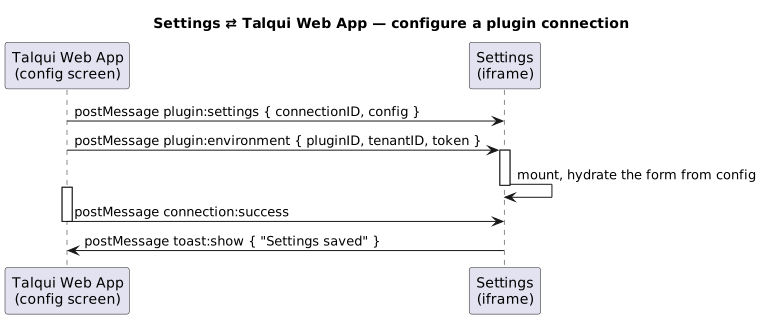
**Load order matters.** `plugin:environment` arrives **after** `plugin:settings`; a robust settings app waits for the environment (which carries the token) before mounting or before making any authenticated call. The reference implementations mount the app inside the `plugin:environment` handler for exactly this reason.
See how this dialogue is implemented in the [`talqui-oss/talqui-plugin-example`](https://github.com/talqui-oss/talqui-plugin-example/tree/master/apps/settings/src) settings app: it listens for both events, waits for the environment, and only then mounts its form.
***
## Calling the backend from settings
With the `token` from `plugin:environment`, the settings page can call **two** kinds of API:
* The **plugin backend** (`/v1/*`) — e.g. to validate an external credential the admin just entered, or to run an onboarding step.
* The **Talqui Core REST API** — e.g. to read tenant-level metadata needed to render the form.
As always, credentials to external systems and any sensitive validation belong on the **backend**, not in this browser app. The settings page collects input and calls the backend to validate, persist, and act on configuration changes.
***
## Relationship to the other elements
The three elements form a closed loop around the plugin connection:
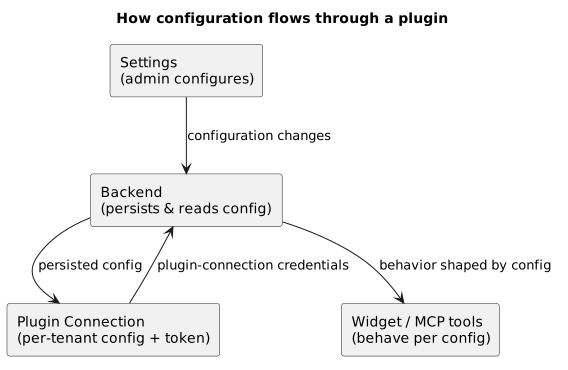
The **settings page collects input**, the **backend handles persistence and validation** (scoped by the plugin-connection credentials described in [Authentication](/guides/introduction/authentication)), and the **widget and MCP tools behave according to the stored configuration**. This is why the same plugin can serve wildly different tenants from one codebase.
The operator-facing element that behaves according to this configuration.
How the backend reads per-tenant configuration.
Build all three elements from the boilerplate.
This documentation is built and hosted on [Mintlify](https://mintlify.com), a developer documentation platform.