> ## Documentation Index
> Fetch the complete documentation index at: https://docs.talqui.chat/llms.txt
> Use this file to discover all available pages before exploring further.
# Conversation Observer
## A headless plugin that reacts to the platform
Where the [Ice Cream Shop](/guides/plugins/use-cases/ice-cream-shop) is a rich, operator-facing plugin, this use case is its opposite: a **backend-only** plugin with **no widget and no settings page**. It has no UI at all. Its entire job is to **listen to what happens on the platform** and react — automatically enriching conversations the moment they begin. It is the canonical example of a plugin built purely on the **RTM (Real-Time Messages)** channel.
This page **describes the design and construction** of such a plugin — the flow, the pieces, and the decisions. It is intentionally **conceptual, not a coding tutorial**: read it to understand *how the plugin works and how it is built*, then apply the RTM bridge that ships in the boilerplate to implement your own.
***
## Contextualization
A business wants every incoming conversation to arrive **already qualified**. The relevant facts about a customer, however, live in a **system outside Talqui** — a data warehouse, a customer database, a loyalty platform. When a new conversation starts, an operator (or the virtual agent) currently sees only the raw contact (a phone number, a name), with none of that external context attached.
The goal is to close that gap **invisibly and instantly**: the moment a conversation is opened, something should look the contact up in the external database and **decorate the Talqui contact and conversation** with what it finds — for example a customer tier, an account status, a region, or a churn-risk flag — expressed as **tags** and **metadata**. No human triggers it; it simply happens.
This is impossible to do from a widget or settings page, because those only exist while a UI is open. It requires a component that is **always listening** to platform events — which is exactly what the RTM bridge provides.
***
## Objective
Build a plugin that, **for every newly started conversation**, automatically:
1. **receives** the "conversation started" event from Talqui in real time;
2. **identifies** the contact behind that conversation;
3. **queries** an external database for facts about that contact; and
4. **writes** those facts back onto Talqui as **tags and metadata** on the contact and the conversation — via the Talqui **REST API**.
The result: operators and the virtual agent see a fully-enriched conversation from the very first message, with zero manual work.
***
## Participating elements
This plugin uses **only the backend** — and specifically its **RTM bridge**. There is no widget and no settings page.
| Element | Present? | Role |
| - | - | - |
| **Backend** (`apps/api`) | ✅ | Opens the RTM connection, consumes events, calls the external DB, and calls the Talqui REST API to write tags/metadata. |
| **Widget** | ✕ | Not needed — there is no operator-facing UI. |
| **Settings** | ✕ | Not needed for the core flow. (A real deployment might add one later, e.g. to hold the external DB credentials per tenant.) |
The backend itself is composed of a few clear responsibilities:
* **RTM client** — a SocketIO + REST connection to the Talqui **RTM channel**. The boilerplate ships this bridge; it activates when the plugin is configured with a `PLUGIN_ID` and an RTM address, and it is what lets the plugin **register itself against tenants** and **subscribe to their events**.
* **Event handler** — the logic that runs when a "conversation started" event arrives.
* **External data adapter** — the connector to your outside database (SQL, a warehouse, an HTTP data API).
* **Talqui REST client** — authenticates as a **plugin connection** and calls Core to attach tags/metadata (see [Authentication](/guides/introduction/authentication)).
***
## The dynamics — how it works at runtime
The plugin sits between two systems it does not own: the Talqui platform (which emits events and accepts REST writes) and your external database (which holds the enrichment data). Its lifecycle has a **setup phase** (once, on boot) and a **reaction phase** (per conversation).
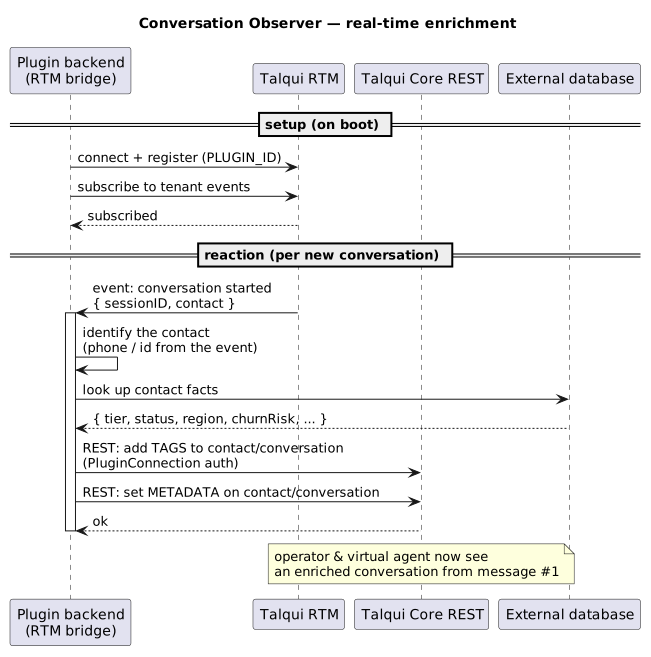
Step by step:
1. **On boot**, the backend opens its RTM connection, registers under its `PLUGIN_ID`, and subscribes to the events of the tenants that installed it. From this point it is **always listening** — no request/response, the platform *pushes* events to it.
2. **A conversation starts.** Talqui emits a "conversation started" event onto the RTM channel; the plugin receives it, carrying enough to identify the **session** and the **contact** (see [Sessions](/guides/platform/sessions) and [Session Start](/guides/platform/sessions/session-start) for what a session is and how it is identified).
3. **The plugin identifies the contact** from the event payload (e.g. a phone number or an external id) and **queries the external database** for the facts it cares about.
4. **The plugin writes back.** Using the Talqui **REST API** — authenticated as a **plugin connection**, so the write is scoped strictly to that tenant — it attaches **tags** (e.g. `vip`, `at-risk`) and **metadata** (structured key/values) to the contact and the conversation.
By the time an operator or the virtual agent looks at the conversation, it is already labeled and enriched.
***
## How it is built
A few design points are worth calling out, because they are what make this pattern robust:
* **It is event-driven, not polled.** The RTM channel *pushes* events; the plugin reacts. There is no scanning or scheduling — enrichment happens within moments of a conversation starting.
* **It authenticates per tenant.** Writes to Core use **plugin-connection** credentials so that a plugin installed on many tenants can only ever modify the tenant the event belongs to. This isolation is the same one described in [Architecture](/guides/plugins/architecture) and [Authentication](/guides/introduction/authentication).
* **It is resilient to the outside world.** The external database may be slow or briefly unavailable; the handler should tolerate that (time-outs, retries, and never blocking the event loop) so a hiccup enriches late rather than failing the conversation.
* **It is idempotent.** The same conversation event might be delivered more than once; writing tags/metadata should be safe to repeat without creating duplicates.
* **It reads the boilerplate's RTM bridge.** The [`talqui-oss/talqui-plugin-example`](https://github.com/talqui-oss/talqui-plugin-example) backend already contains the optional RTM bridge described in [Backend › The RTM bridge](/guides/plugins/backend); this use case is what that bridge is for. Configure it, add your event handler, external adapter, and Core client, and you have a Conversation Observer.
***
## Take-aways
* A plugin can be **entirely headless** — no widget, no settings — and still deliver enormous value by reacting to platform events.
* The **RTM bridge** is the mechanism for "always listening" behavior; it is optional and activates only when configured.
* Enrichment writes go through the **REST API** under **plugin-connection** auth, keeping every tenant's data strictly isolated.
* Combined with an operator-facing plugin like the [Ice Cream Shop](/guides/plugins/use-cases/ice-cream-shop), event-driven plugins like this one let Talqui present a **rich, unified, pre-qualified** workspace — again, without the operator ever switching tabs.
The operator-facing counterpart to this headless plugin.
The RTM bridge and how the backend authenticates.
What a session is and how a conversation is identified.
Plugin-connection credentials for scoped REST writes.
This documentation is built and hosted on [Mintlify](https://mintlify.com), a developer documentation platform.