> ## Documentation Index
> Fetch the complete documentation index at: https://docs.talqui.chat/llms.txt
> Use this file to discover all available pages before exploring further.
# Ice Cream Shop
## A plugin over an internal stock & orders system
This is the most complete use case and it maps **directly onto the public boilerplate**, [`talqui-oss/talqui-plugin-example`](https://github.com/talqui-oss/talqui-plugin-example) — you can read every element referenced here as real, runnable code. It is the ideal starting point for understanding how the pieces of a plugin come together in a live conversation.
***
## Contextualization
Imagine an **ice-cream shop** that sells and takes orders over WhatsApp, Instagram, and a web chat — all funneled into Talqui. The shop already runs an **internal system** that owns two things the business cares about during a conversation:
* **Stock** — which flavors exist, whether they are available, and how much is in each batch.
* **Orders** — placing a new order for a customer and confirming it.
Today, when a customer asks *"do you still have pistachio?"* or *"I'll take two scoops of vanilla"*, the operator has to leave the conversation, open the internal system in another tab, look up the answer or type the order, and come back. That context-switching is slow, error-prone, and scales badly across dozens of simultaneous chats. It is exactly the pain the plugin model was built to remove.
***
## Objective
Bring the shop's stock and orders **into the conversation** so that:
* the **human operator** can browse flavors, see live stock, and place an order **without leaving Talqui**; and
* the **virtual agent** can answer stock questions and even place orders **autonomously**, using the same underlying capabilities.
Both consumers must act on the **same source of truth** (the shop's internal system) and behave consistently, so a flavor that is out of stock is out of stock whether a human or the agent is handling the chat.
***
## Participating elements
This plugin ships **two of the three elements** — a backend and a widget. It needs **no settings page**, because there is nothing tenant-specific to configure for the demo; a real shop that wanted per-tenant credentials would simply add one.
| Element | Role in this use case | Where in the repo |
| - | - | - |
| **Backend** (`apps/api`) | Bridges Talqui to the shop's internal system. Exposes the capabilities **twice**: as **MCP tools** for the virtual agent and as **REST routes** for the widget, both delegating to the same use cases. | [`apps/api`](https://github.com/talqui-oss/talqui-plugin-example/tree/master/apps/api) |
| **Widget** (`apps/widget`) | The operator-facing panel in the conversation sidebar: a **Flavors** tab (catalog + stock), a **Stock** tab, and an **order form** opened as a popup. | [`apps/widget`](https://github.com/talqui-oss/talqui-plugin-example/tree/master/apps/widget) |
The backend's surface, in concrete terms:
| Capability | MCP tool (agent) | REST route (widget) |
| - | - | - |
| List / search flavors | ✓ | `POST /v1/flavors/search` |
| Read one flavor | ✓ | `POST /v1/flavors/read` |
| List stock | ✓ (`StockList`) | `POST /v1/stock/list` |
| Create an order | ✓ (`OrderCreate`) | `POST /v1/orders/create` |
Exposing each capability **twice** — once for the agent, once for the operator — is the deliberate pattern that lets automation and human work share one coherent behavior. Both paths call the same use case, so there is a single source of business logic. See [Backend](/guides/plugins/backend/).
***
## The dynamics of use
There are **two runtime flows**, and the whole point of the plugin is that they feel like one product.
### Flow A — the human operator, in the widget
When the operator opens (or switches to) a conversation, Talqui renders the widget in the sidebar and the widget runs its **boot dialogue** to discover which conversation it is attached to (see [Widget](/guides/plugins/widget)). It then calls the backend's REST routes to render live data, and can open an order form as a **popup** over the conversation.
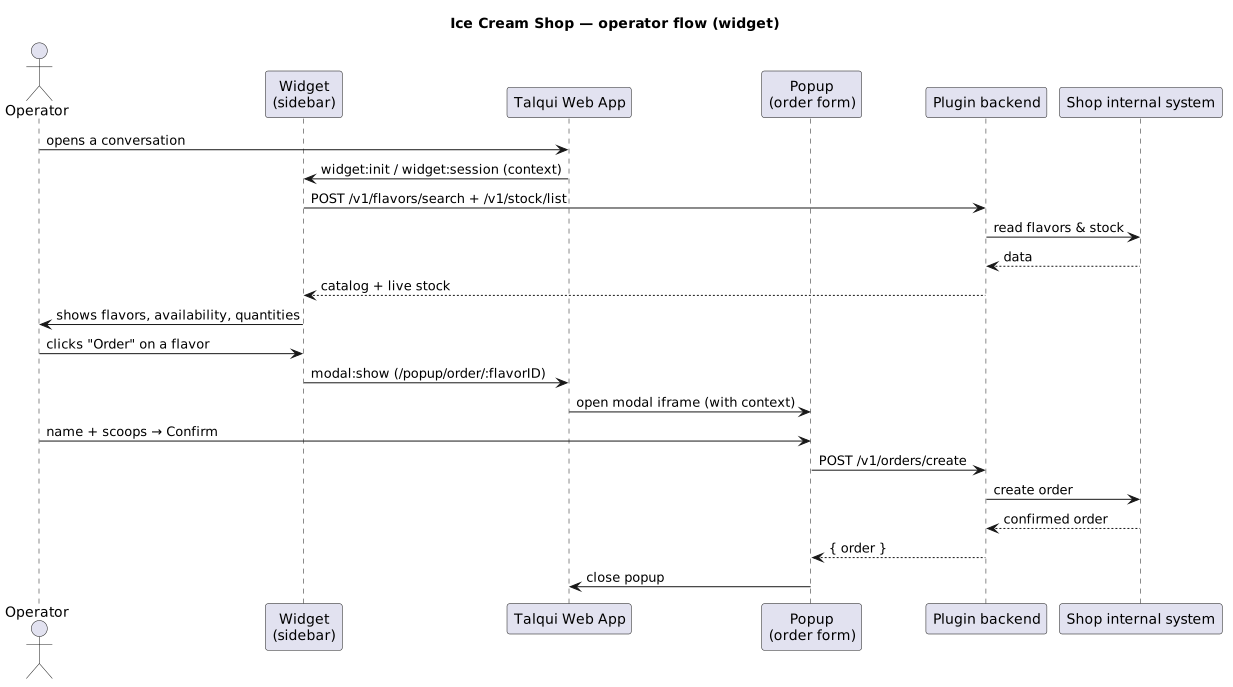
The operator never left Talqui: they read stock and placed an order **inside the conversation window**.
***
### Flow B — the virtual agent, via MCP tools
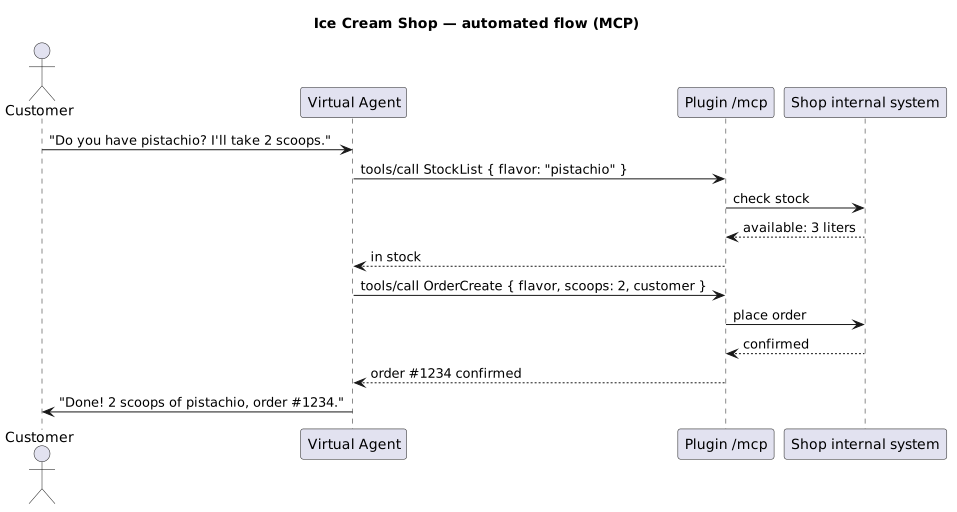
The exact same capabilities are available to the **virtual AI agent** during automated attendance. Because the backend registered `StockList`, `OrderCreate`, and the flavor tools over MCP, the agent can discover and call them mid-conversation — no human required.
### Why this is a unified experience
The two flows are two doors into the **same room**. Whether the customer is served by automation or by a human who takes over, the plugin reads and writes the **same internal system** through the **same use cases**, and the operator sees the result **in the conversation they are already looking at**. That is the core promise of plugins: operators (and the agent) work **inside Talqui**, with external context and actions at hand, without constantly switching tabs.
***
## Take-aways
* A plugin can serve **both** the agent and the operator from one backend by exposing capabilities as **MCP tools and REST routes** over the same use cases.
* The **widget** turns the backend's reads/writes into an in-conversation experience; **popups** handle actions that need a form.
* **No settings page** was needed here — proof that you include only the elements a use case calls for (see [Architecture](/guides/plugins/architecture)).
A headless, event-driven plugin using only the backend + RTM.
The sidebar UI and its context dialogue.
MCP tools and REST routes.
Clone this exact example and make it your own.
This documentation is built and hosted on [Mintlify](https://mintlify.com), a developer documentation platform.