> ## Documentation Index
> Fetch the complete documentation index at: https://docs.talqui.chat/llms.txt
> Use this file to discover all available pages before exploring further.
# Widget
## The conversation widget
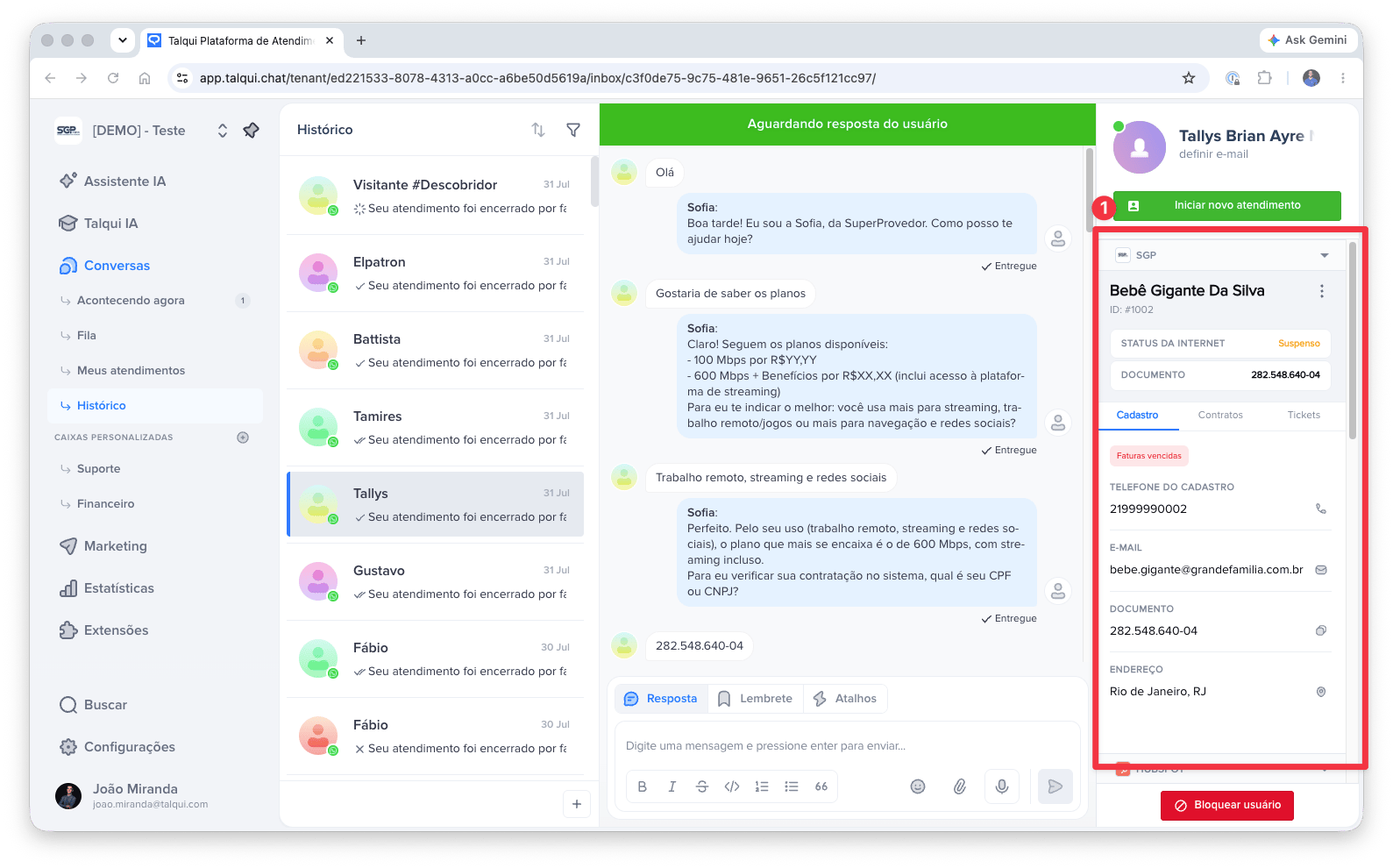
The **widget** is the operator-facing element of a plugin: a small single-page application that Talqui embeds **as an iframe in the right sidebar of the conversation screen**. While an operator answers a chat, the widget sits next to the conversation and surfaces exactly the external context and actions that conversation needs — an order status, a customer's CRM record, a button to open a ticket — so the operator **never has to leave Talqui or switch browser tabs** to get their job done. This is the single most important product outcome of the widget: a **unified workspace**.
A complete, working example is available in the [`talqui-oss/talqui-plugin-example`](https://github.com/talqui-oss/talqui-plugin-example/tree/master/apps/widget) repository: the ice-cream shop widget with Flavors and Stock tabs, and a popup for placing orders. Use it as a reference for the boot dialogue, calling the backend, and opening popups.
 ***
## Why the widget is "stateless per conversation"
The widget is **re-rendered from scratch every time the operator opens a different conversation**. When the agent switches from one chat to another, Talqui reloads the widget's iframe entirely, giving it a **fresh context** for the newly selected conversation. The widget holds no memory of the previous chat — it treats every load as a clean start.
This design is deliberate and has a direct consequence for how you build: **the widget must, on every load, ask the platform which conversation it is now attached to.** It does not read that from a URL it controls or from local storage; it obtains it through a live **dialogue** with the host over the iframe boundary.
***
## The communication channel
An iframe and the page that hosts it are isolated by the browser: for security, they cannot call each other's code. The **only** way across the boundary is the browser's `postMessage` channel. The widget therefore opens what is best understood as a **small event channel** with the Talqui Web App and holds a short **dialogue** over it:
* The **parent** (Talqui Web App) posts messages **down** into the iframe. The widget receives them with `window.addEventListener('message', …)`.
* The **widget** posts messages **up** to the parent with `window.top.postMessage(…)`.
Every message is a JSON envelope of the shape `{ name, data, widgetID? }`; anything that is not one of these is ignored.
### The boot dialogue
Think of the exchange below as a **question and its answer**. On load, the widget is told who it is, reports how tall it wants to be, and then *asks the platform which conversation is currently open*. The platform **answers** with that conversation's session. From that answer, the widget knows the **session** and the **contact** it is now serving and can call the backend scoped to them.
| Step | Direction | Event | Meaning |
| - | - | - | - |
| 1 | host → widget | `widget:init` | *"You are instance `widgetID`."* |
| 2 | widget → host | `widget:height` | *"Render my iframe this tall."* |
| 3 | widget → host | `widget:acquire-session` | **The question:** *"Which conversation (session) is open right now?"* |
| 4 | host → widget | `widget:session` | **The answer:** the current session payload (session + contact context). |
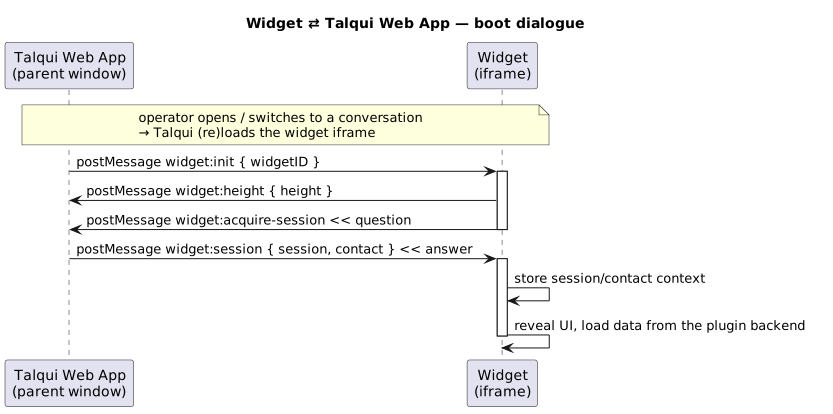
Because the platform hands the widget the **session and its contact**, the plugin can build a genuinely **unified experience**: it knows *who* the operator is talking to and *which* conversation this is, without the operator ever telling it. For the meaning of a session and how conversations are opened and identified, see [Sessions](/guides/platform/sessions) and [Session Start](/guides/platform/sessions/session-start).
**Identity comes from the host, not from the widget.** The widget never guesses the current conversation; it always derives it from the `widget:session` answer. This is what guarantees the sidebar is always showing context for the conversation the operator is actually looking at.
You can see this boot dialogue implemented in the [`talqui-oss/talqui-plugin-example`](https://github.com/talqui-oss/talqui-plugin-example/tree/master/apps/widget/src): the ice-cream shop widget listens for `widget:init`, reports its height, sends `widget:acquire-session`, and then stores the session context to scope its backend calls.
***
## Calling the backend
Once the widget knows its session, it calls the plugin **backend's REST routes** to fetch and mutate data. The **operator's access token**, delivered by the host as part of the widget's context, is attached to those requests so the backend can authorize them (see [Backend › Authentication](/guides/plugins/backend) and [Authentication](/guides/introduction/authentication)). All integration logic stays on the server; the widget only renders and dispatches.
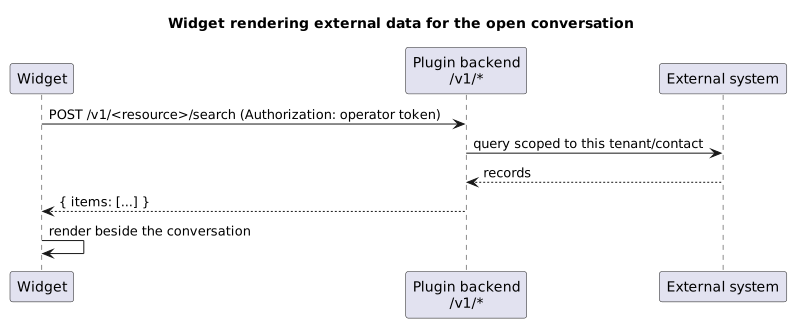
In practice, the ice-cream shop widget calls `POST /v1/flavors/search` and `POST /v1/stock/list` to populate its tabs. See the implementation in the [`talqui-oss/talqui-plugin-example`](https://github.com/talqui-oss/talqui-plugin-example/tree/master/apps/widget/src) to see how requests are built with the session context and authorization token.
***
## Popups: acting without leaving the conversation
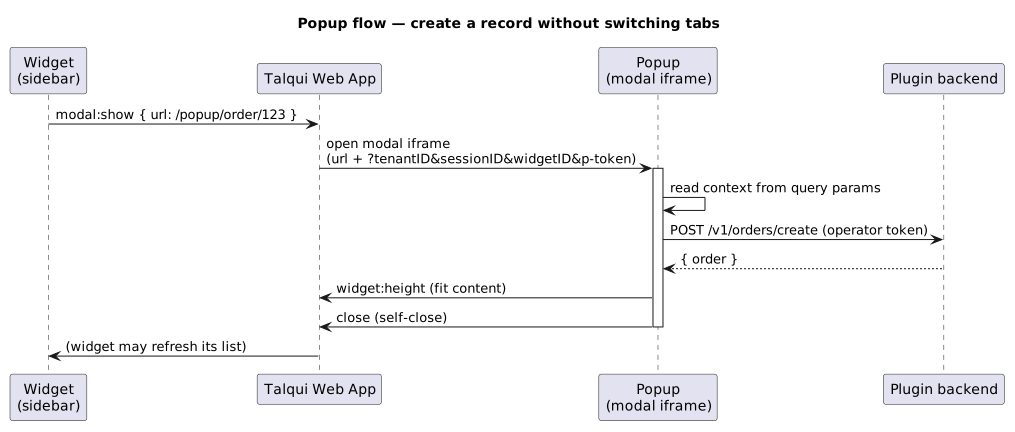
Some actions need more room than a sidebar — a multi-field form, a confirmation step. For these, a widget can ask the host to open a **second, modal iframe floating over the conversation**: a **popup**. The widget sends a **`modal:show`** event up to the host with a URL to load; the host opens that URL in its own modal iframe. The URL points **back at the plugin's own front-end** (another route of the same app, e.g. `/popup/order/:id`), so a popup is simply another screen of the plugin.
A popup is a **separate iframe** and therefore does **not** take part in the sidebar's `widget:init` dialogue. Instead, the host appends the context to the popup's URL as query parameters (`?tenantID=&sessionID=&widgetID=&p-token=`); the popup reads them on load and uses the token to call the backend. When it finishes (for example, after creating a record), the popup closes itself with a self-close message.
| Event | Direction | Purpose |
| - | - | - |
| `modal:show` | widget → host | Open a popup at a given URL (a `/popup/...` route of the plugin). |
| `widget:height` | popup → host | Report the popup's content height so the host sizes the modal. |
| *close* | popup → host | Dismiss the popup (self-close protocol). |
***
## Why the widget is "stateless per conversation"
The widget is **re-rendered from scratch every time the operator opens a different conversation**. When the agent switches from one chat to another, Talqui reloads the widget's iframe entirely, giving it a **fresh context** for the newly selected conversation. The widget holds no memory of the previous chat — it treats every load as a clean start.
This design is deliberate and has a direct consequence for how you build: **the widget must, on every load, ask the platform which conversation it is now attached to.** It does not read that from a URL it controls or from local storage; it obtains it through a live **dialogue** with the host over the iframe boundary.
***
## The communication channel
An iframe and the page that hosts it are isolated by the browser: for security, they cannot call each other's code. The **only** way across the boundary is the browser's `postMessage` channel. The widget therefore opens what is best understood as a **small event channel** with the Talqui Web App and holds a short **dialogue** over it:
* The **parent** (Talqui Web App) posts messages **down** into the iframe. The widget receives them with `window.addEventListener('message', …)`.
* The **widget** posts messages **up** to the parent with `window.top.postMessage(…)`.
Every message is a JSON envelope of the shape `{ name, data, widgetID? }`; anything that is not one of these is ignored.
### The boot dialogue
Think of the exchange below as a **question and its answer**. On load, the widget is told who it is, reports how tall it wants to be, and then *asks the platform which conversation is currently open*. The platform **answers** with that conversation's session. From that answer, the widget knows the **session** and the **contact** it is now serving and can call the backend scoped to them.
| Step | Direction | Event | Meaning |
| - | - | - | - |
| 1 | host → widget | `widget:init` | *"You are instance `widgetID`."* |
| 2 | widget → host | `widget:height` | *"Render my iframe this tall."* |
| 3 | widget → host | `widget:acquire-session` | **The question:** *"Which conversation (session) is open right now?"* |
| 4 | host → widget | `widget:session` | **The answer:** the current session payload (session + contact context). |

Because the platform hands the widget the **session and its contact**, the plugin can build a genuinely **unified experience**: it knows *who* the operator is talking to and *which* conversation this is, without the operator ever telling it. For the meaning of a session and how conversations are opened and identified, see [Sessions](/guides/platform/sessions) and [Session Start](/guides/platform/sessions/session-start).
**Identity comes from the host, not from the widget.** The widget never guesses the current conversation; it always derives it from the `widget:session` answer. This is what guarantees the sidebar is always showing context for the conversation the operator is actually looking at.
You can see this boot dialogue implemented in the [`talqui-oss/talqui-plugin-example`](https://github.com/talqui-oss/talqui-plugin-example/tree/master/apps/widget/src): the ice-cream shop widget listens for `widget:init`, reports its height, sends `widget:acquire-session`, and then stores the session context to scope its backend calls.
***
## Calling the backend
Once the widget knows its session, it calls the plugin **backend's REST routes** to fetch and mutate data. The **operator's access token**, delivered by the host as part of the widget's context, is attached to those requests so the backend can authorize them (see [Backend › Authentication](/guides/plugins/backend) and [Authentication](/guides/introduction/authentication)). All integration logic stays on the server; the widget only renders and dispatches.

In practice, the ice-cream shop widget calls `POST /v1/flavors/search` and `POST /v1/stock/list` to populate its tabs. See the implementation in the [`talqui-oss/talqui-plugin-example`](https://github.com/talqui-oss/talqui-plugin-example/tree/master/apps/widget/src) to see how requests are built with the session context and authorization token.
***
## Popups: acting without leaving the conversation
Some actions need more room than a sidebar — a multi-field form, a confirmation step. For these, a widget can ask the host to open a **second, modal iframe floating over the conversation**: a **popup**. The widget sends a **`modal:show`** event up to the host with a URL to load; the host opens that URL in its own modal iframe. The URL points **back at the plugin's own front-end** (another route of the same app, e.g. `/popup/order/:id`), so a popup is simply another screen of the plugin.
A popup is a **separate iframe** and therefore does **not** take part in the sidebar's `widget:init` dialogue. Instead, the host appends the context to the popup's URL as query parameters (`?tenantID=&sessionID=&widgetID=&p-token=`); the popup reads them on load and uses the token to call the backend. When it finishes (for example, after creating a record), the popup closes itself with a self-close message.
| Event | Direction | Purpose |
| - | - | - |
| `modal:show` | widget → host | Open a popup at a given URL (a `/popup/...` route of the plugin). |
| `widget:height` | popup → host | Report the popup's content height so the host sizes the modal. |
| *close* | popup → host | Dismiss the popup (self-close protocol). |

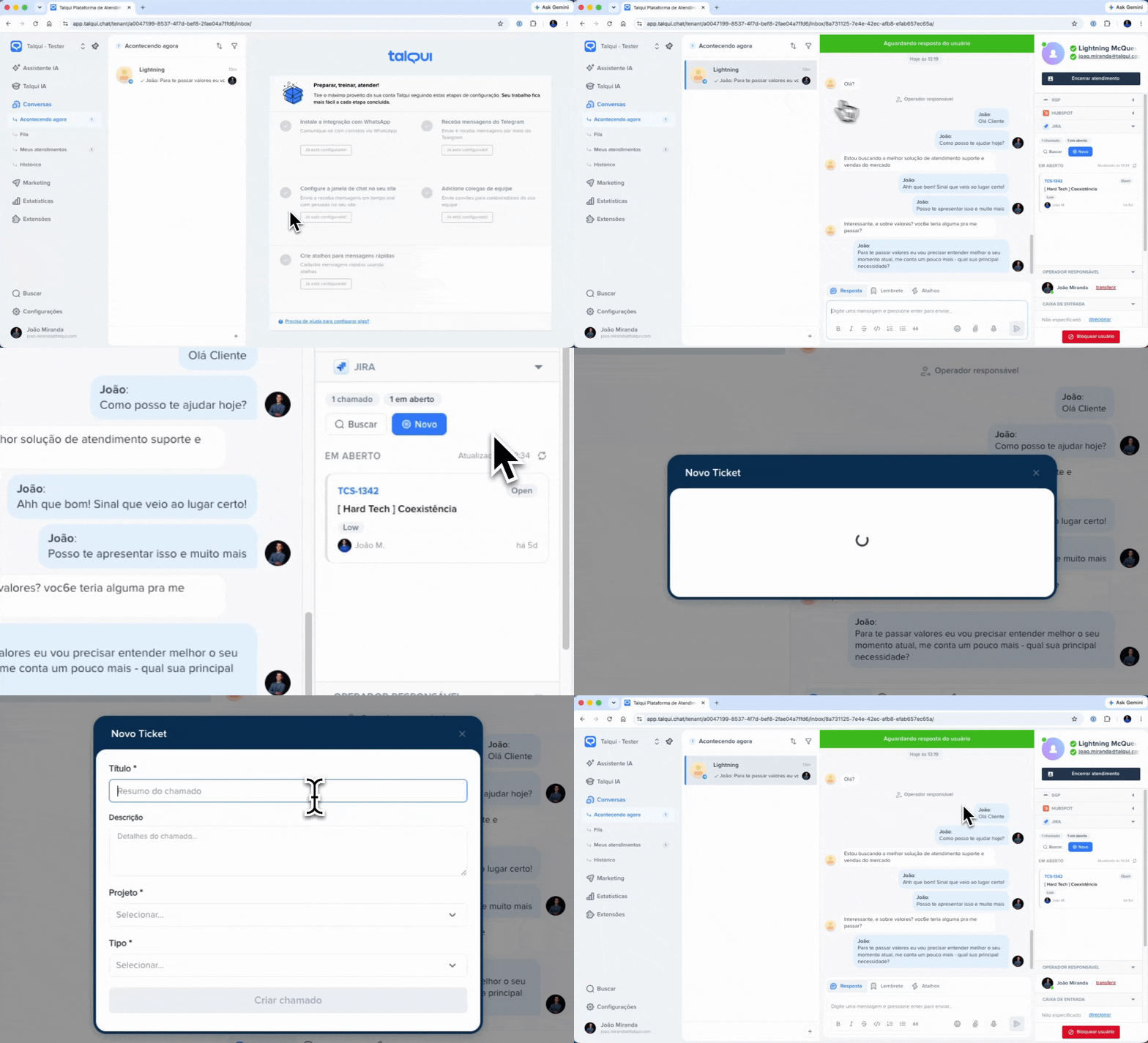 The ice-cream shop example demonstrates this pattern in action: when the operator clicks "Order" on a flavor, the widget sends `modal:show` with the order form URL, and the popup opens over the conversation. Once the order is confirmed (via `POST /v1/orders/create`), the popup closes itself. See the implementation in [`talqui-oss/talqui-plugin-example`](https://github.com/talqui-oss/talqui-plugin-example/tree/master/apps/widget/src/components).
***
## Design guidance
* **Do the least in the browser.** The widget renders and dispatches; the backend owns credentials and integration logic.
* **Always derive context from `widget:session`.** Never assume the previous conversation's data survives a reload.
* **Report your height.** Use `widget:height` so the iframe fits its content and the sidebar looks native.
* **Keep popups self-contained.** They get context from the URL, do one job, and close themselves.
The other embedded UI — configuring the plugin per tenant.
The REST routes the widget calls.
What a session is and how conversations are identified.
This documentation is built and hosted on [Mintlify](https://mintlify.com), a developer documentation platform.
The ice-cream shop example demonstrates this pattern in action: when the operator clicks "Order" on a flavor, the widget sends `modal:show` with the order form URL, and the popup opens over the conversation. Once the order is confirmed (via `POST /v1/orders/create`), the popup closes itself. See the implementation in [`talqui-oss/talqui-plugin-example`](https://github.com/talqui-oss/talqui-plugin-example/tree/master/apps/widget/src/components).
***
## Design guidance
* **Do the least in the browser.** The widget renders and dispatches; the backend owns credentials and integration logic.
* **Always derive context from `widget:session`.** Never assume the previous conversation's data survives a reload.
* **Report your height.** Use `widget:height` so the iframe fits its content and the sidebar looks native.
* **Keep popups self-contained.** They get context from the URL, do one job, and close themselves.
The other embedded UI — configuring the plugin per tenant.
The REST routes the widget calls.
What a session is and how conversations are identified.
This documentation is built and hosted on [Mintlify](https://mintlify.com), a developer documentation platform.