

Overview
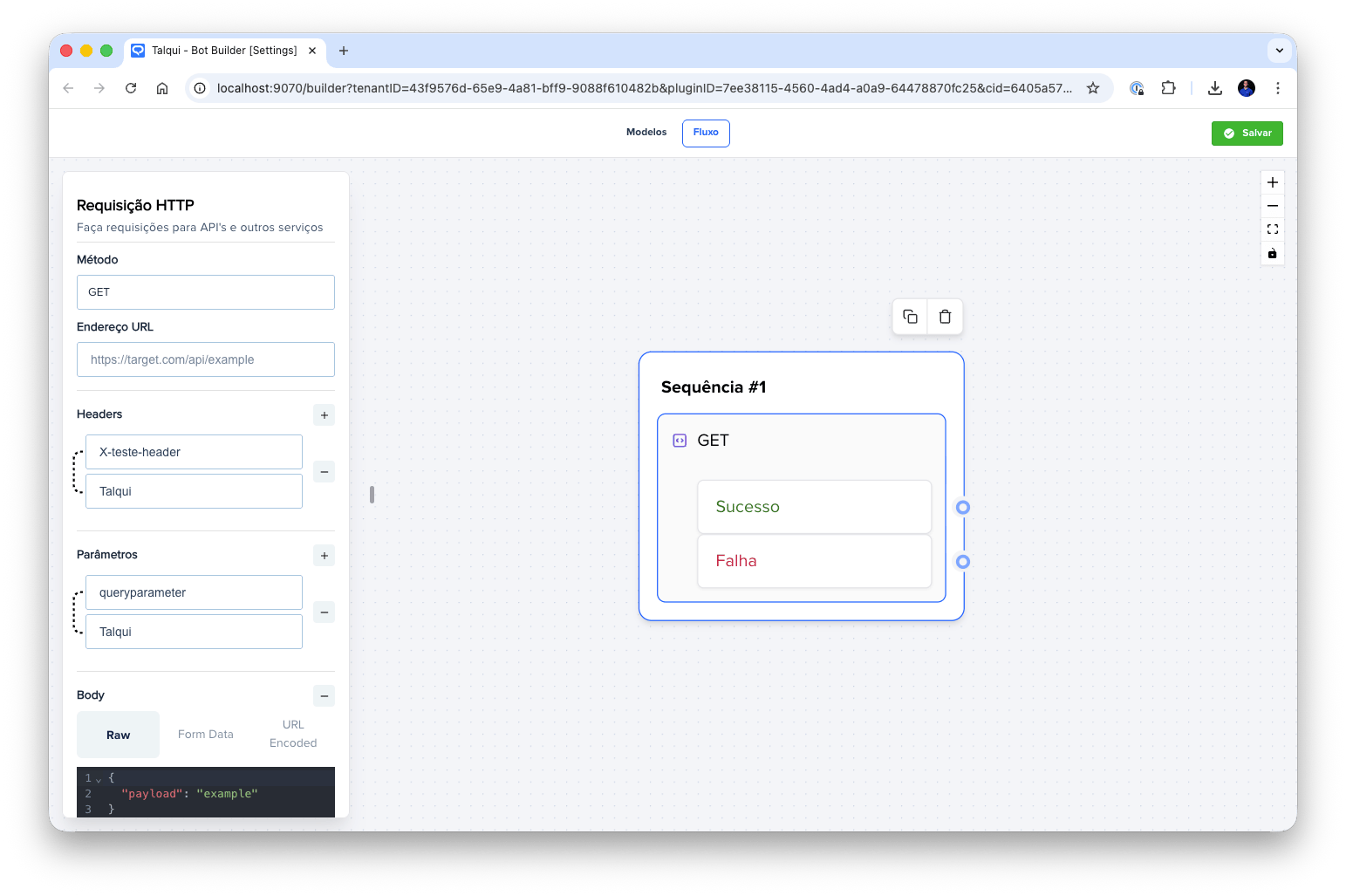
HTTP Neuron
Request Format
When the HTTP Neuron executes a request to your API endpoint, you will receive:Request Identification
All requests sent by the HTTP Neuron include a specific header that identifies the request as originating from Talqui:- User-Agent Header:
Talqui (Neuron DeveloperHttp) v1.0
Request Payload
The HTTP Neuron sends the data you configure in the neuron settings as the request payload. This includes:- Headers: All custom headers you configure in the neuron will be sent in the request
- Query Parameters: Parameters configured for the request will be included in the URL query string
- Request Body: The body content you configure (form-data, URL-encoded, or raw JSON) will be sent according to the selected format
Request Timeout
The HTTP Neuron has a timeout of 20 seconds (20,000 milliseconds). If your API does not respond within this timeframe, the request will be considered failed and the conversation flow will route through the failure output. The HTTP Neuron has exactly two possible outputs: success or failure. When the HTTP request is executed, the system evaluates the response to determine whether the request was successful or failed, and routes the conversation flow accordingly. This binary decision model simplifies flow design for most use cases, where developers typically need to handle either a successful API response or an error scenario. The success path is taken when the HTTP request completes successfully and returns a 2xx status code response, while the failure path is used when the request returns any status code outside the 2xx range, times out, or encounters an error. The HTTP Neuron also supports receiving variables that can be injected into the current conversation context. These variables can be stored in either the contact context or the session context, which are separate entities. The contact context persists across all conversations with a specific contact, while the session context is specific to the current conversation session. This allows developers to pass data between blocks and maintain state throughout the conversation flow.Expected Response Pattern
The HTTP Neuron determines whether to route the conversation to the success or failure output based on the HTTP response received from the target API. The system evaluates the response status code, response body, and other response characteristics to make this determination. Typically, HTTP status codes in the 2xx range (200, 201, 204, etc.) are considered successful, while status codes outside the 2xx range (4xx, 5xx, etc.) are treated as failures.Response Requirements
For a request to be considered successful, your API must return:- HTTP Status Code: A status code in the 2xx range (200, 201, 204, etc.)
- Valid JSON Object: The response body must be a valid JSON object (or the response can be empty, as some 2xx status codes like 204 No Content don’t require a body)
Returning Variables: sessionMeta and contactMeta
If your API returns a valid JSON object, you can include variables that will be stored in the conversation context. The response JSON can contain two optional properties:sessionMeta: Variables stored in the session context (specific to the current conversation session)contactMeta: Variables stored in the contact context (persists across all conversations with a specific contact)
{{ meta.variableName }} syntax.
Variable Flattening
If you return nested objects withinsessionMeta or contactMeta, they will be automatically flattened (planified) and saved as flat objects using dot notation as separators. For example:
Your API Response:
meta.user.name= “John”meta.user.account.id= “12345”
Success and Failure Routing
When the HTTP Neuron executes:-
Success Output: Triggered when the request completes successfully and returns a 2xx status code. If the response is a valid JSON object containing
sessionMetaorcontactMeta, those variables will be stored and made available to subsequent blocks. -
Failure Output: Triggered when:
- The request returns a status code outside the 2xx range
- The request times out (after 20 seconds)
- The request encounters a network error
- The response body contains invalid JSON (when a body is present)