

Overview
Plugins are the extension mechanism of the Talqui platform. A plugin is a self-contained, customer-owned service — plus one or two embedded user interfaces — that Talqui talks to whenever the platform needs to read information or perform an action that lives in your business domain: a CRM, an ERP, a ticketing system, a marketplace, an internal database, or any third-party API. Instead of forcing every capability into the core product, Talqui exposes a small, well-defined contract and lets developers plug new behavior into it independently, continuously, and without touching the core. This guide explains what plugins are, why they exist, how they are structured, and how each moving part communicates with the platform. Before you write any code, read this overview end-to-end; the deep-dive pages linked at the bottom then cover the backend, the widget, the settings page, and the path from a boilerplate to a plugin published on the platform.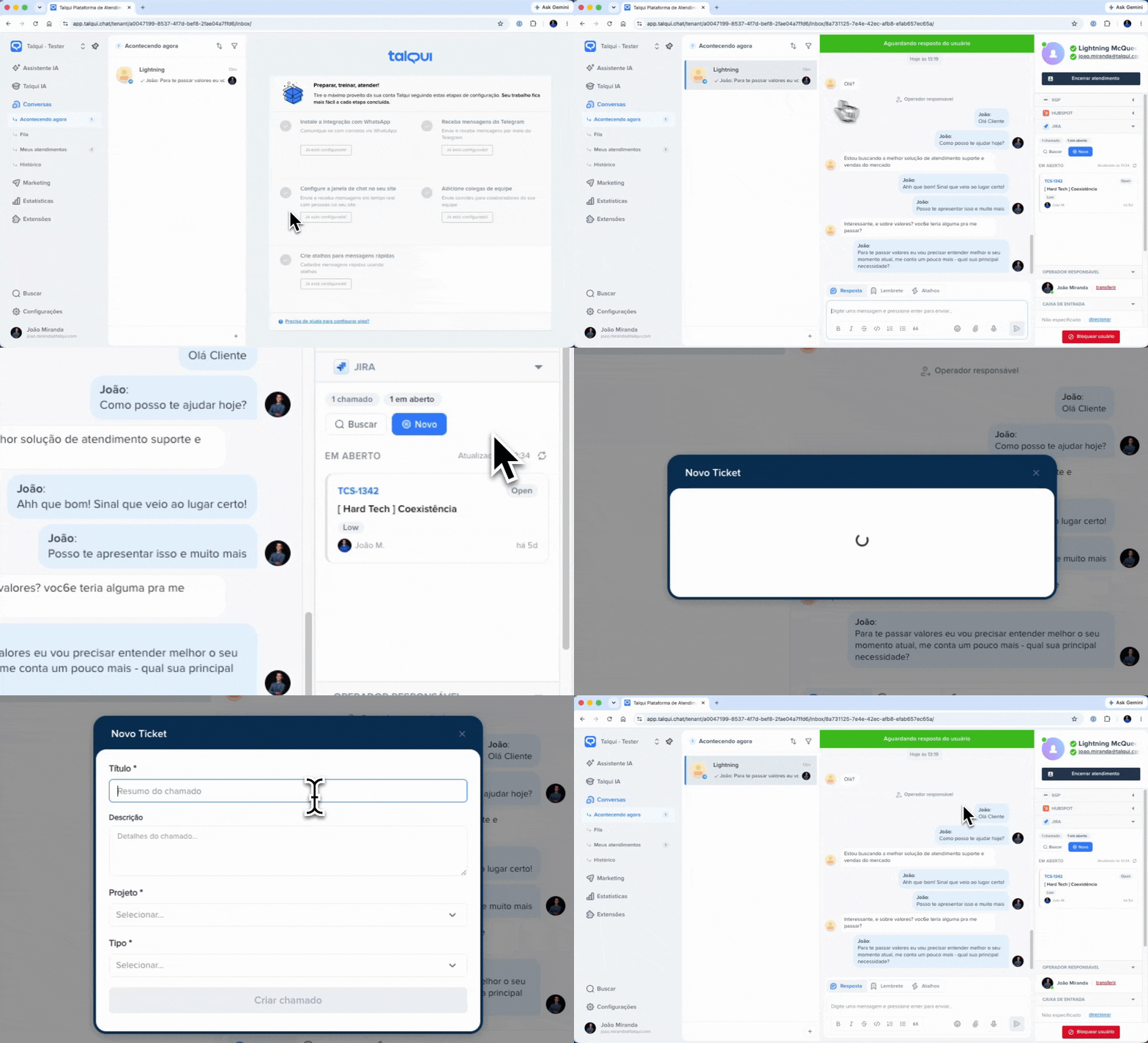
Plugin Widget in Action
Why plugins exist
Talqui was built by engineers who spent years operating customer-communication systems that were fundamentally closed. Every time the business needed a new behavior — surface an order status next to a conversation, open a ticket without leaving the chat, sync a contact to a CRM the moment a session started — the answer from the incumbent tools was the same: not supported, wait for the roadmap, or leave the platform and glue things together yourself. The inability to expand the communication layer was a recurring, expensive pain: integrations were bespoke, brittle, and impossible to reuse across customers. Talqui was designed from the opposite premise. The platform is deliberately structured as a plug-and-play host: a stable core that owns messaging, sessions, and the operator experience, surrounded by a contract that anyone can extend. The goals behind that decision are worth stating explicitly, because they shape every design choice in this guide:- Easy — a developer should be able to go from an empty repository to a working extension in hours, not weeks, reusing a documented boilerplate and a small set of platform events.
- Independent — a plugin runs on your infrastructure, ships on your release cadence, and fails in isolation. A bug in a plugin never takes the core platform down, and the core evolving never silently breaks your plugin, because the contract between them is explicit and versioned.
- Continuous — extensions can be built, deployed, and improved over time without platform-side releases. Once your endpoint is registered, iterating on it is entirely on your side.
The unifying promise for operators: the whole point of a plugin’s UI surfaces is to let an agent work inside Talqui — reading external context and taking external actions right where the conversation happens — without constantly switching browser tabs. Every design decision in the widget and settings layers serves that promise.
What a plugin can do
A plugin plugs into Talqui through two independent consumption surfaces. Most real plugins use both, but either one alone is a valid plugin.
Because both surfaces speak to the same backend, a plugin can offer a coherent experience across automation and human work: the same “create order” capability can be a tool the virtual agent calls and a button the operator clicks in the widget.
The three elements of a plugin
Plugins are composed of up to three elements, typically organized as apps inside one monorepo. None of them is individually mandatory — a plugin is whatever combination of the three your use case needs. You can ship a backend-only plugin (tools for the virtual agent, no UI), a UI-only plugin (a widget and/or a settings page, with no backend of your own), or all three together. Each element is built, hosted, and deployed independently.
The combinations are all valid and common:
- Backend only — a plugin that just gives the virtual agent tools, or listens to platform events over RTM and reacts (see the Conversation Observer use case).
- Backend + widget (+ settings) — a plugin that surfaces and acts on an internal system while an operator is on a call (see the Ice Cream Shop use case).
- Widget and/or settings only — a purely front-end extension, with no backend of your own.
How the pieces fit together
The core platform is the host. It never calls your code directly across a trust boundary it doesn’t control; instead, every interaction happens over one of three explicit channels:- MCP over HTTP — the virtual agent lists and calls your tools.
- REST over HTTP — any Talqui service (or your own clients) calls your routes.
postMessageacross the iframe boundary — the Web App and your embedded UIs exchange events (the widget/settings never share memory with the host page; they exchange structured messages).
Plugins Architecture
Identity, installation, and trust
A plugin is registered on Talqui and receives a stable identity: apluginID and a pluginToken. When a tenant administrator installs your plugin, Talqui creates a plugin connection — a per-tenant record (pluginConnectionID + pluginConnectionToken) that also stores that tenant’s configuration. This distinction is central to everything that follows:
- The plugin identity authenticates as “this extension, across every tenant that installed it”.
- The plugin connection identity authenticates as “this extension, scoped strictly to one tenant”.
Where to go next
Getting Started
Build a plugin from the public boilerplate and submit it to Talqui.
Architecture
The anatomy of a plugin, its identity, and the plugin-connection model.
Backend
The plugin service — REST, MCP tools, the RTM bridge, and how the virtual agent calls you.
Widget
The conversation-sidebar UI and the postMessage dialogue that identifies the open conversation.
Settings
The tenant configuration page and the plugin-connection lifecycle.
Use Cases
Practical, end-to-end examples of plugins in action.